Speak and Translate Languages
- 4.7
- Rating
- 10.00M
- Installs
- Free
- Price
 Analysis by App-foxy
I found Speak and Translate Languages most useful when I treated it as a quick communication aid rather than a complete replacement for a human interpreter. It belongs to the communication category and focuses on spoken translation, voice input, and speech-to-text interaction. In everyday use, that combination can make a short exchange less stressful: you speak, check the translated text, and let the other person hear or read the result.
That basic workflow sounds simple, but its value depends on how comfortably you can read the screen, speak clearly, hear the output, and correct mistakes. My experience is that the app is at its best when both people can slow down for a moment and confirm what was said. It is less convincing when a conversation is fast, noisy, private, or dependent on exact wording.
The main strength is flexibility between voice and text. Someone who cannot or does not want to speak every sentence can rely more heavily on typed or displayed text, while another person may prefer listening to the translated result. That makes it more adaptable than a phrasebook, although the quality of the conversation still depends on the language pair and the clarity of the original message.
You May Also Like

 Blood Strike: 2.5 Anniversary
Blood Strike’s Loadouts Turn Every Drop Into a Tactical Gamble
A close look at Blood Strike’s custom loadouts: how fast access to signature weapons reshapes its battle royale rhythm, rewards preparation, and narrows the gap between fights.

 Pandora - Music & Podcasts
Pandora’s Music Is Easy to Start, but Harder to Recover
Pandora’s strength is its low-effort path from a seed to a station. Its weak spot is how much confidence it asks you to place in connection, setup, and quiet recovery.

 8 Ball Pool
 Is Built on Rivalries, Rematches, and Routine
A close look at the rivalries, rematches, shared routines, and unanswered safety questions that turn a quick pool match into a persistent mobile community.

 Samsung Music
’s Quiet Strength Is Playing What You Already Own
Its reach comes less from spectacle than from dependable access to a personal library. That simplicity is both the app’s strongest retention engine and its ceiling.

 AccuWeather: Weather Radar
AccuWeather Review: A Quick, Clear Forecast for Everyday Decisions
For everyday plans, the best forecast is the one you can understand quickly. AccuWeather makes rain timing, radar, and local conditions easy to act on, with a few trade-offs.

 Hill Climb Racing
Why Hill Climb Racing Still Turns Crashes Into One More Run
A tiny car, a bumpy hill and one more upgrade: Hill Climb Racing keeps resurfacing because its simple chaos makes every near-miss feel personal.
More From Our News Desk



How the interface supports different ways of communicating
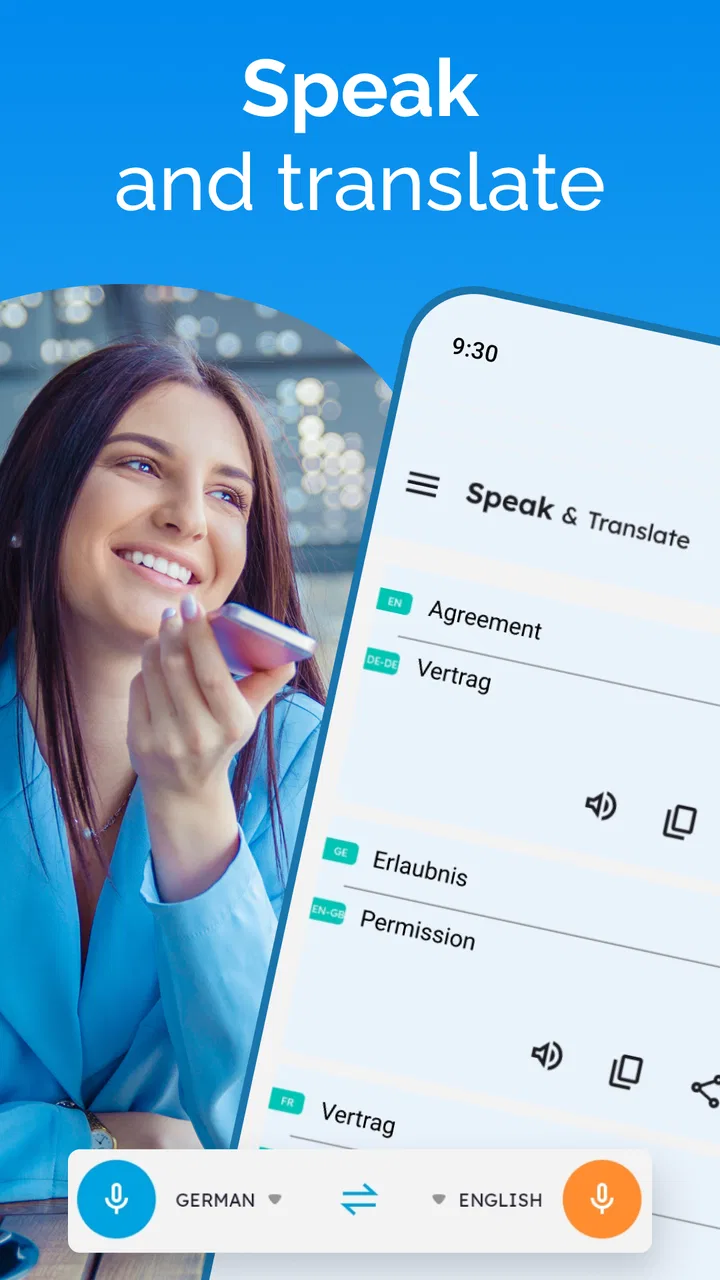
I find that the interface matters most when a conversation is already a little awkward: both people need to understand what to do without a long explanation. In this section, I look at how choosing between speaking and reading can make short exchanges more accessible, and why checking the recognized words before sharing them is a useful habit. That flexibility helps, but the setting can still decide whether the exchange goes smoothly.
Readable navigation for quick exchanges
As a communication app, Speak and Translate Languages is built around a task I can understand immediately: choose the needed language, provide a phrase, and review the translation. That direct purpose matters for people who may find a crowded productivity app tiring to navigate. When I am standing at a station, counter, or hotel desk, I do not want to search through several unrelated tools before reaching the translator.
The speech-to-text approach also gives the interaction a useful visual checkpoint. Instead of trusting the spoken interpretation without seeing it, I can look at the recognized words and notice when the app has misunderstood a name, place, or number. This is particularly helpful for people who process written information more comfortably than audio, or for anyone communicating in a noisy environment where listening is difficult.
Readability is not only about whether letters are visible. It is also about having enough time to inspect a sentence before passing the phone to someone else. I recommend preparing short phrases rather than dictating a long explanation. Shorter input is easier to scan, easier to correct, and less likely to hide one incorrect word inside a large block of text.
For a person with dyslexia, limited language confidence, or difficulty processing speech quickly, the text stage can be more manageable than a voice-only translator. I would still proofread important details. A translation that looks fluent can remain wrong in a way that is not obvious to someone who does not know the target language.
Voice input is helpful, but not effortless
Voice translation can reduce the physical effort of typing, which is valuable when I am carrying luggage, wearing gloves, or dealing with a small phone keyboard. It can also help someone with limited hand movement who finds repeated tapping uncomfortable. In those situations, speaking a short request may be much faster than entering it character by character.
There is a trade-off, though. Voice input requires the app to hear the words correctly, and the user has to speak in a way the recognition system can follow. Strong background noise, overlapping speech, an unfamiliar accent, or a person who speaks softly can all make the first attempt less reliable. I get better results by pausing between ideas and saying names or numbers separately.
This is one of the less obvious workflow improvements: I would not dictate a full paragraph and hope for a perfect result. I would break the message into units such as the destination, the time, and the request. After each part appears as text, I can correct it before translating. That takes a little longer, but it prevents one recognition error from changing the entire meaning.
People with speech differences should not assume that voice input will always be the easiest route. The app may still be useful through text, but the experience can become frustrating if the interface strongly encourages speaking and the recognition does not understand the user consistently. For that reason, I see the voice feature as an option, not a requirement.
Useful for hearing differences and mixed communication styles
The speech-to-text element gives the app a practical role in conversations where hearing the other person is difficult. A user can ask someone to speak toward the phone and then read the recognized wording. That does not solve every communication problem, but it can create a written reference instead of relying only on audio.
The reverse situation can work too. If I cannot easily hear the translated speech, I can use the displayed text as the main channel and show it to the other person. This makes the app more suitable for mixed communication styles than a tool that only reads translations aloud.
Still, I would not use it as the sole method for medical instructions, legal explanations, emergency decisions, or anything where a small misunderstanding could cause serious harm. Speech recognition and machine translation can both introduce errors, and accessibility needs do not remove that accuracy risk. In high-stakes situations, a qualified interpreter or a trusted bilingual person is the safer choice.
What the current version means for practical use
The app is free to install, which makes it easy to try before deciding whether it fits a particular communication need. It is suitable for Everyone, and it runs on Android devices using version 5.0 or later. The current version is 8.1.4.2, so users with older phones should check their system compatibility before planning to depend on it during travel.
Speak and Translate Languages was released on November 6, 2018, and the developer shown for it is Battery Stats Saver. Its reach is substantial, with over ten million installs, while its average rating is 4.7 from roughly 297 thousand ratings. Those figures suggest that many people find the basic idea useful, but they do not guarantee that every language, device, accent, or accessibility situation will feel equally smooth.
There are in-app purchases ranging from $0.99 to $99.99 per item. I would pay attention to what is available without spending before building a travel routine around the app. A free starting point is welcome, but a user who needs a particular capability repeatedly should understand the purchase flow first rather than discovering a limitation in the middle of a trip.
Where it works in real situations, and where it starts to struggle
I find the app most dependable when the question is short, the surroundings are calm, and both people have time to check the result. This section considers practical situations where that rhythm is helpful, along with the moments when noise, privacy, or complicated wording make another approach wiser. Knowing those limits helps me treat translation as a bridge for everyday needs, not a guarantee of perfect understanding.
A realistic travel conversation
Imagine arriving at a hotel in a country whose language you do not speak. You need to explain that the reservation is under your name and ask whether breakfast is included. Instead of trying to pronounce a memorized sentence, you can speak one short idea, inspect the recognized text, translate it, and show the result to the receptionist. The receptionist can then answer, and you can repeat the process in the other direction.
This scenario shows why I prefer a turn-by-turn rhythm. One person speaks, the app processes the message, both people look at the result, and the next person responds. It is slower than a fluent conversation, but it gives each side a chance to catch a misunderstanding. If the first translation is unclear, I would simplify the sentence rather than repeat it louder or add more words.
The same method works at a pharmacy counter for a simple request, at a restaurant when checking an ingredient, or while asking for directions. In each case, the app is most helpful when the goal is concrete. “Where is the train station?” is a better input than a long story about your travel plans. The shorter the message, the easier it is to verify.
Situational access in noisy or public places
Accessibility changes with the setting. A quiet room gives voice recognition a fair chance, while a busy street may make it difficult to capture the right words. Public transport adds announcements, engines, and people speaking nearby. In those contexts, I would move closer to the microphone, speak in short phrases, and keep the text view central to the exchange.
There is also a privacy consideration in public use. Speaking a personal address, booking detail, or health-related message aloud may not be comfortable. Text input becomes the better choice when the subject is sensitive or the surroundings are crowded. This is an important advantage of having more than one input method: the app can adapt to the environment instead of forcing every conversation into voice.
For users with low vision, the practical question is whether the displayed text can be read comfortably on their particular phone. I would test the interface at the intended text size before travelling, especially if the person depends on magnification or needs high contrast. I would not assume that a translation app’s visual layout will suit every reader simply because the words are technically present.
For users with limited dexterity, the app may reduce typing but still require accurate taps to select languages, start recording, stop input, or move between messages. A slower workflow with deliberate pauses can help. If repeated tapping causes pain or fatigue, it is worth testing a few typical exchanges at home rather than judging the app after one quick sentence.
How it compares with familiar alternatives
A paper phrasebook is more predictable in poor connectivity and can be easier when you only need a few common expressions. It also avoids recognition errors. Its weakness is that it cannot adapt to an unexpected question. Speak and Translate Languages is more flexible for that situation because you can create a phrase on the spot and use speech-to-text as part of the exchange.
A standard text translator may be preferable for careful writing, long messages, or situations where you want to edit every word before sending it. This app has a more conversational feel, especially when voice input and spoken output are useful. The cost of that convenience is that fast, informal speech can be harder to verify than a message you have typed slowly.
A human interpreter remains the better option for nuanced, confidential, or high-consequence communication. The app is a bridge for everyday needs, not a substitute for professional judgment. I would choose it for directions, basic service questions, and casual travel exchanges, but not for signing documents, explaining symptoms in detail, or negotiating an important agreement.
Barriers that can change the experience
The biggest barrier is not the number of languages suggested by the app’s purpose; it is the gap between a simple sentence and a complicated meaning. Idioms, humor, regional expressions, names, measurements, and context can all produce a result that sounds reasonable while missing the intended point. I get more dependable outcomes when I use plain language and avoid combining several requests in one recording.
Another barrier is the need for cooperation from the other person. A translation app cannot make someone wait, speak clearly, or read the screen. In a rushed queue, a busy clinic, or a tense conversation, the extra steps may feel awkward. The app is therefore most inclusive when both people accept a slower exchange and are willing to confirm important details.
Users should also consider the cost of relying on voice in places where speaking is impractical. A person with a quiet voice, a speech impairment, or anxiety about speaking to strangers may prefer text from the beginning. I would prepare a few essential sentences in writing before leaving home and use live translation for unexpected needs, not as the only plan.
Because the app includes optional purchases, families and assistive-technology users should be careful when handing the phone to another person. I would complete any purchase decisions in advance and make sure the person using the app knows which controls are needed for ordinary translation. That small preparation can prevent confusion during a stressful interaction.
Who should use it and who should skip it
I recommend Speak and Translate Languages to travellers, international students, hosts welcoming visitors, and anyone who occasionally needs a quick spoken translation. It is especially appealing if you want to switch between voice and visible text instead of relying on a single communication mode. Its free entry point also makes it reasonable to test with the languages and situations you actually expect to encounter.
I would be more cautious if you need guaranteed precision, a fully hands-free workflow, or a tool designed specifically around a particular disability. The app can support those users in some situations, but its usefulness depends on the phone, the environment, the person’s speech and hearing preferences, and the complexity of the conversation. A dedicated accessibility tool, a text-first translator, or human assistance may be a better fit.
My practical advice is to test three things before depending on it: a short spoken request, a typed private message, and a reply that you read rather than hear. Try them in a quiet place and then in the kind of environment where you expect to use the app. That quick rehearsal reveals whether the controls, text display, and communication pace work for you.
After using it this way, I see Speak and Translate Languages as a useful, approachable communication helper with a meaningful accessibility benefit: it lets people move between speech and text during the same exchange. It does not remove the barriers created by noise, unclear speech, difficult wording, small controls, or high-stakes accuracy.
My inclusive verdict is positive, with sensible limits. I would keep it available for everyday travel and short multilingual conversations, particularly when showing written translations is easier than speaking or listening. I would pair it with preparation and, when the consequences matter, human support. For casual communication it can make a real difference; for complex or critical conversations, it should remain a backup rather than the final authority.
FAQs for Speak and Translate Languages
01How accurate is the translation provided by the Speak and Translate Languages app?
The Speak and Translate Languages app offers a high level of accuracy, leveraging advanced AI algorithms for real-time translations. However, like any translation tool, it may occasionally struggle with slang, idioms, or context-specific phrases. It's advisable to double-check critical translations, especially in professional settings.
02Does the app support offline translation?
Yes, the Speak and Translate Languages app offers offline translation capabilities for several popular languages. Users need to download the necessary language packs in advance. While offline mode is convenient, users should note that the translation might be slightly less accurate than when the app is connected to the internet.
03What languages are supported by the app?
The Speak and Translate Languages app supports a wide range of languages, including but not limited to English, Spanish, French, German, Chinese, and Japanese. The app regularly updates its database, adding new languages and dialects to enhance its global usability. Users can check the app store listing for the most current list of supported languages.
04Are there any subscription costs associated with the app?
The app offers a basic version for free, which includes essential features. However, for enhanced functionality like offline translations, voice recognition, and ad-free usage, users can opt for a premium subscription. Pricing details and package options can be found within the app or on its official website, ensuring transparency before purchase.
05How user-friendly is the app for beginners?
The Speak and Translate Languages app is designed with a user-friendly interface, making it accessible for beginners and tech-savvy users alike. It includes intuitive navigation, clear instructions, and helpful tutorials to guide first-time users. Additionally, the app’s customer support is available to assist with any queries, ensuring a smooth experience.
Pros
- Supports multiple languages seamlessly.
- Real-time translation for quick communication.
- User-friendly interface with intuitive design.
- Offline mode available for select languages.
- Voice and text input for flexibility.
Cons
- Requires internet for full functionality.
- Occasional inaccuracies in translation.
- Limited offline language options.
- Ads in free version can be intrusive.
- Subscription needed for premium features.

Speak and Translate Languages
Gallery